



Many online stores start with template-based solutions. And that makes sense — a ready-made theme allows businesses to launch quickly, save money at the beginning, and start selling without months of custom development. That’s why WooCommerce, OpenCart, and ready-made Shopify themes are such popular choices for small and medium-sized businesses.
At first, everything usually works fine. There’s a product catalog, shopping cart, payment system, and delivery setup — the store handles all the basic tasks. But as the business grows, more products, traffic, ads, and integrations begin to appear, and the template-based store slowly turns from a “quick solution” into a real limitation.
Pages start loading slower, SEO growth stalls, checkout becomes unstable, and every new feature requires endless modifications. Businesses lose customers — often without even realizing how much revenue is disappearing because of technical issues.
In this article, we’ll look at 10 reasons why a template-based online store can hurt sales growth — and what you can do about it without relying on endless plugins and temporary fixes.
1. Slow Page Loading Speed
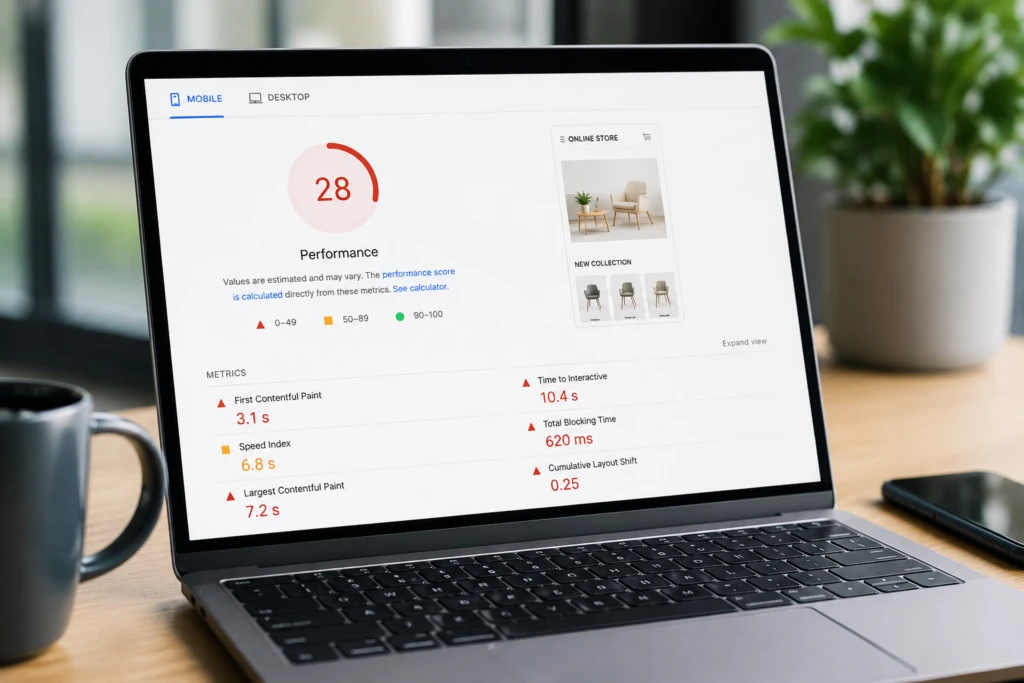
One of the most common problems with template-based stores is poor performance. Most ready-made themes are overloaded with features that many businesses never actually need. Inside the template, there may be dozens of styles, animations, scripts, page builders, and modules constantly loading in the background.
At first, the issue may not be obvious. But once the store fills up with products, banners, SEO modules, and marketing integrations, the system becomes significantly slower.
This is especially critical for mobile users. If a product page takes 5–7 seconds to load, many visitors simply leave the site and move to a competitor.
For eCommerce, speed directly impacts conversion rates. A slow website usually means:
- fewer orders
- more expensive advertising traffic
- higher bounce rates
- worse Google rankings
What to do
In most cases, the problem requires a combination of optimizations:
- image optimization
- enabling caching
- removing unnecessary plugins
- replacing heavy themes
- database optimization
- moving some features into custom-built solutions
2. Poor Mobile UX
Today, most purchases happen on smartphones. But many templates are only “technically responsive.” The website may look beautiful on a desktop, while being frustrating to use on mobile devices.
Typical problems include:
- tiny buttons
- inconvenient navigation menus
- filters covering content
- text that’s too small
- laggy scrolling
- oversized banners
- complicated checkout flows
Because of this, users simply abandon the purchase process.
Many store owners review the website only from a desktop computer and never notice mobile usability issues. Real customers, however, interact with the site in a completely different way.
Good mobile UX is not just about having a responsive design — it’s about creating a fast, simple interface where users can place an order within minutes.
3. Checkout Is Overloaded With Unnecessary Steps
Checkout is the most important stage of any online store. This is where businesses either get paid or lose the customer.
In template-based stores, checkout is often built using outdated logic. The system may require:
- account registration
- unnecessary contact information
- email confirmation
- multiple checkout steps
- extra fields
For customers, this creates unnecessary friction.
The issue becomes even more noticeable on smartphones, where every additional field reduces the chance of completing the order.
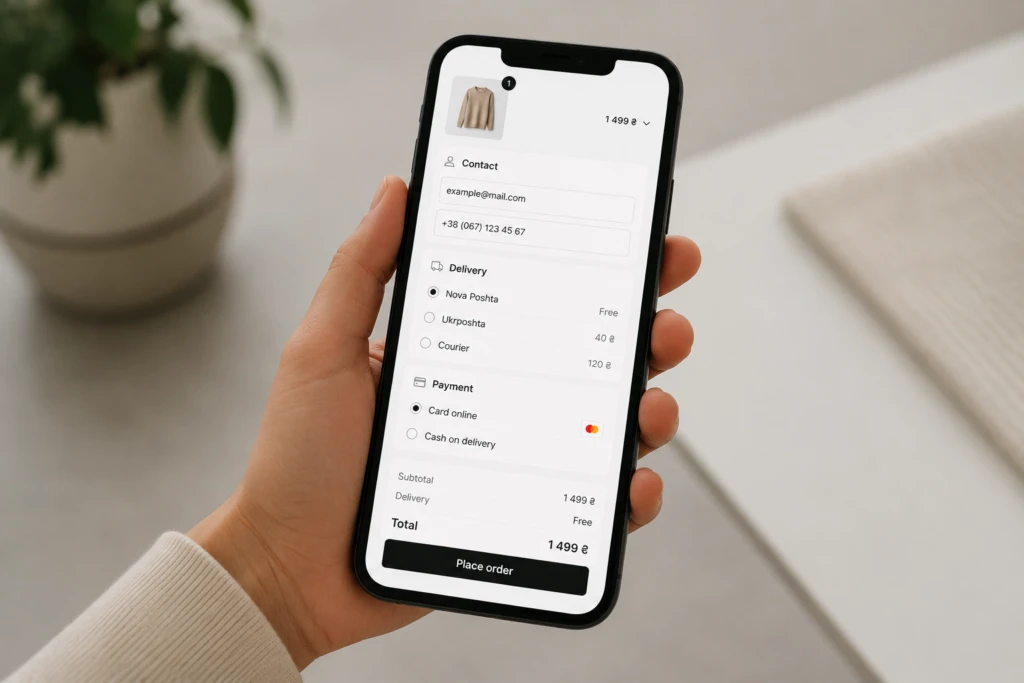
What improves checkout conversion
The most effective checkout flows usually include:
- guest checkout
- minimal number of fields
- autofill support
- fast payment methods
- clear structure
- properly optimized mobile experience
Sometimes even simplifying checkout by one or two steps can noticeably increase sales without increasing the advertising budget.
4. Too Many Plugins
This is a classic issue for almost every template-based store.
First, the owner installs an SEO plugin. Then a caching module. Then filters. Then a page builder. Then several integrations.
A year later, the store may already be running on 30–50 plugins at the same time.
The system gradually becomes unstable:
- plugin conflicts appear
- errors become more common
- performance drops
- updates break functionality
- server load increases dramatically
And most importantly — the more “fixes” the system relies on, the harder it becomes to maintain in the future.
5. The Template Doesn’t Match Business Processes
Ready-made themes are designed for the widest possible audience. But every business has its own internal processes.
For example:
- wholesale pricing
- multiple warehouses
- custom delivery logic
- complex order statuses
- CRM integrations
- B2B functionality
- personalized customer conditions
In template-based stores, these tasks are often implemented through chaotic modifications.
At some point, the system starts looking like a collection of temporary workarounds where every new feature risks breaking something else.
6. SEO Structure Quickly Becomes a Problem
Many templates have serious SEO issues right out of the box.
This is especially noticeable in stores with large catalogs, filters, and categories.
Typical problems include:
- duplicate pages
- incorrect pagination
- messy URLs
- weak internal linking
- duplicate meta titles
- automatically generated SEO pages without proper logic
Google ends up wasting crawl budget on indexing junk pages instead of properly ranking the products and categories that should actually be selling.
7. The Website Starts Breaking Under Load
At the beginning, the store may work perfectly even on cheap hosting. But as the number of products, visitors, and integrations grows, the situation changes.
This becomes especially noticeable during:
- promotions
- seasonal sales
- Black Friday
- ad campaign launches
- bulk product imports
Typical symptoms include:
- slow admin panel
- frozen checkout
- checkout errors
- overloaded servers
- unstable website behavior
For businesses, this means direct revenue loss.
8. The Store Looks “Like Everyone Else”
Popular templates are used by thousands of stores. Because of this, customers stop perceiving the website as a unique brand.
Even if the products are good, the store may still look cheap or generic.
In eCommerce, users subconsciously judge a store’s credibility by its interface and overall look — often before they’ve even looked at the products.
Even small design customizations here tend to move trust and conversion rates more than owners expect.
9. Every Modification Becomes Expensive
At first, templates seem like an affordable solution. But over time, businesses constantly spend money on:
- feature modifications
- bug fixes
- speed optimization
- plugin conflicts
- update compatibility
- support for outdated plugins
After several years, the total cost of these “small fixes” may exceed the cost of proper custom development.
This is one of the main reasons why many businesses eventually migrate to custom solutions.
10. The Business Becomes Afraid of Making Changes
This is the final stage of a problematic template-based store.
The team already knows that:
- updates may break the website
- new plugins may conflict with old ones
- checkout works inconsistently
- the website may crash under traffic spikes
The business becomes afraid to change anything at all — and that turns into a real limitation on growth.
Fix Plan: What to Do Next
The biggest mistake is trying to solve every issue by installing another plugin.
A systematic approach works much better.
A basic improvement plan usually looks like this:
- Perform a technical audit
- Analyze website speed and mobile UX
- Identify conversion loss points
- Optimize checkout
- Remove unnecessary modules
- Fix the SEO structure
- Optimize the server and database
- Decide whether optimization is enough or if migration to a different architecture is required
In many cases, a store can be significantly improved without rebuilding everything from scratch. But problems like these are worth solving at the architectural level, rather than endlessly patching the system.
Conclusion
A template is a perfectly reasonable way to start. The real question is when it stops keeping up with the business — and most owners notice that less from a metrics dashboard than from the growing feeling that every new feature takes more effort than it should.
If three or four of these problems sound familiar, start with a technical audit instead of another plugin: find out exactly what speed, checkout, and SEO issues are costing you, then decide from those numbers whether optimization is enough or a move to a different architecture makes more sense.