


Launching an online store in 2026 is no longer just about “building a website.” Businesses need a fast, stable, and user-friendly eCommerce platform that works smoothly with payments, shipping, CRM systems, marketing tools, and SEO.
That’s exactly why the cost of a WooCommerce store today is much more than simply “the price of a website.”
In this article, we’ll break down the real cost of a WooCommerce online store in Ukraine in 2026, what affects the budget, where businesses usually overspend, and how to understand which solution is right for your company.

Why WooCommerce Is Still Popular in 2026
WooCommerce remains one of the most popular eCommerce platforms in the world. In Ukraine, small and medium-sized businesses especially choose it because it allows them to launch online sales relatively quickly without building a complex system from scratch.
The biggest advantage of WooCommerce is flexibility. You can start with a simple store and later scale the project step by step by adding integrations, automation, custom modules, SEO features, and even B2B functionality.
However, there’s an important detail: WordPress itself is free, but a real commercial online store consists of dozens of additional components. Those components are what actually shape the final budget.
What Determines the Cost of a WooCommerce Store
The price of an online store in 2026 depends on much more than just design.
The main factors that affect the budget include:
- number of products;
- catalog complexity;
- design type;
- required integrations;
- SEO setup;
- speed optimization;
- custom functionality;
- traffic load;
- post-launch support.
For example, a store with 100 products using a standard template can cost 5–7 times less than a project with ERP integration, multilingual support, advanced pricing logic, and a custom dealer dashboard.
How Much Does a Basic WooCommerce Store Cost?
The simplest option is a template-based store for small businesses or startups.
This format usually includes a ready-made theme, standard WooCommerce functionality, and a minimal set of plugins.
A basic launch often includes:
- WordPress and WooCommerce installation;
- template setup;
- basic design customization;
- product catalog;
- cart and checkout;
- payment integration;
- shipping setup;
- mobile responsiveness;
- basic SEO optimization.
In Ukraine, a basic WooCommerce store in 2026 usually costs between $800 and $2,500 depending on the studio and project complexity.

Mid-Level Stores: The Most Popular Business Option
Most companies in 2026 no longer want “just a website.” Businesses expect their online store to be:
- fast;
- SEO-friendly;
- stable;
- marketing-ready;
- scalable.
That’s why the mid-range segment today is no longer just a generic template store. It’s usually a partially customized WooCommerce solution.
These projects often include:
- custom UI/UX design;
- custom product pages;
- SEO filters;
- CRM integration;
- product import automation;
- multilingual setup;
- speed optimization;
- caching systems;
- security improvements;
- analytics and advertising event tracking.
The average cost of these WooCommerce stores in Ukraine in 2026 is typically between $3,000 and $8,000.
For most businesses, this is considered the optimal balance between cost and functionality.
When WooCommerce Becomes Expensive
Many business owners assume WordPress is always cheap. But in large eCommerce projects, the situation changes dramatically.
WooCommerce can become significantly more expensive if the project includes:
- tens of thousands of products;
- advanced filtering;
- high traffic loads;
- нестандартна логіка;
- B2B dashboards;
- personalized pricing;
- ERP integrations;
- automated inventory synchronization;
- custom business workflows.
At this point, development starts to resemble a fully custom-built platform. Budgets can easily start from $10,000–15,000 and continue growing.
That’s one of the reasons why some businesses eventually migrate from WooCommerce to Laravel or other custom solutions.
Where Businesses Usually Overspend
One of the biggest problems with WordPress stores is uncontrolled project growth.
At first, everything seems inexpensive:
“Let’s just install another plugin.”
A year later, the business ends up with:
- 40+ plugins;
- update conflicts;
- slow performance;
- duplicate pages;
- checkout issues;
- SEO problems;
- unstable admin panel behavior.

Technical debt often becomes the largest hidden expense.
That’s why a good WooCommerce store in 2026 is not about “adding more plugins.” It’s about proper architecture and controlled scaling.
Ongoing Costs After Launch
Many businesses calculate only the development budget and forget about ongoing expenses.
After launch, WooCommerce stores usually require:
- hosting;
- domain renewal;
- premium plugins;
- backups;
- technical support;
- updates;
- SEO services;
- advertising;
- feature improvements.
On average, WooCommerce maintenance in Ukraine in 2026 ranges from $100 to $1,000+ per month depending on business size and complexity.
What’s Better in 2026: WooCommerce or Custom Development?
For small and medium-sized businesses, WooCommerce is still one of the best options in terms of price-to-functionality ratio.
However, if a business grows rapidly, has complex workflows, or handles large-scale operations, sooner or later custom development becomes a serious consideration.
The most important thing is not choosing a platform “for life.” What matters more is selecting the right solution for your current business stage and avoiding unnecessary complexity at the beginning.
Final Thoughts
In 2026, the cost of a WooCommerce online store in Ukraine can vary dramatically — from a simple template-based solution to a large-scale eCommerce platform with custom architecture.
For small businesses, WooCommerce remains an excellent way to launch online sales quickly without massive investments. But to avoid problems a year later, it’s important to think about structure, SEO, performance, and scalability from the very beginning.
The key is to focus not only on the initial development price, but also on how much the store will cost to maintain, update, and scale over the next 2–3 years.
Launching an online store is not just about “building a website.” For a business, it’s an investment in sales, automation, and future growth. One of the most expensive mistakes is choosing a contractor based only on attractive design or the lowest price.
In reality, most problems happen not because of the CMS or technology itself, but because of weak planning, poor architecture, or chaotic development without clear processes.
In this article, we’ll explain how to choose the right eCommerce development agency and which questions you should ask before signing a contract.

Why Choosing the Wrong Agency Can Be Expensive
Mistakes in selecting a contractor are rarely visible at the beginning. At first, everything looks fine: there are mockups, the website works, products are uploaded.
But after a few months, the real problems begin:
- the website becomes slow;
- SEO performance does not improve;
- making changes becomes difficult;
- checkout breaks after updates;
- integrations work unstably;
- every modification becomes expensive;
- there is no proper technical support.
As a result, businesses either keep “patching” the store or completely rebuild it within 1–2 years.
Question #1. What Technologies Do You Specialize In?
A good agency does not do “everything for everyone.”
Some teams specialize in WooCommerce, others in OpenCart, and some focus on Laravel or custom B2B systems.
You need to understand:
- what type of projects they build most often;
- what industries they work with;
- whether they have experience in your niche;
- whether they have launched stores with similar requirements.
For example, a fashion store and a B2B platform for a manufacturer require completely different architecture.
If your business needs:
- personalized pricing;
- user roles;
- complex integrations;
- business process automation,
then an agency focused only on template-based websites may not be the best choice.
Question #2. Which CMS or Technology Do You Recommend and Why?
If an agency immediately pushes “only WordPress” or “only Laravel” without analyzing your business needs, that’s a warning sign.
A professional team first asks about:
- number of products;
- expected traffic;
- SEO requirements;
- integrations;
- scaling plans;
- B2B functionality;
- marketing goals;
- budget and timeline.
Only after that should they recommend a platform.

Question #3. What Is Included in the Price?
One of the most common problems is a “cheap” estimate that later becomes two or three times more expensive.
Always clarify whether the price includes:
- responsive design;
- basic SEO optimization;
- website speed optimization;
- cache configuration;
- payment and shipping integrations;
- product import;
- multilingual setup;
- testing;
- post-launch support.
You should also ask:
- which plugins are paid;
- whether licenses are required;
- who pays for hosting;
- how much future improvements will cost.
Question #4. How Is Your Workflow Organized?
A strong agency always has a clear process.
Usually, it looks like this:
- Business analysis and requirements gathering
- Prototyping
- Design
- Development
- Testing
- Content upload
- Launch
- Support
If someone says, “Send us examples and everything will be ready in a month,” that’s risky.
Make sure to ask:
- whether there is a project manager;
- how tasks are managed;
- where communication happens;
- how deadlines are controlled;
- whether they use a staging server for testing.
Question #5. How Do You Handle SEO?
Many online stores are built without considering SEO structure from the start.
As a result, businesses face:
- duplicate pages;
- filter indexing problems;
- poor crawling;
- slow loading speed;
- weak internal linking.
Ask the agency:
- how they build URL structures;
- how SEO filters are implemented;
- whether they optimize Core Web Vitals;
- how internal linking is organized;
- whether schema markup is included;
- how duplicate pages are handled.
For eCommerce projects, this is critical.
Question #6. What Happens After Launch?
Many business owners think the store is “finished” after launch.
In reality, the main work often starts afterward:
- bug fixing;
- conversion optimization;
- scaling;
- updates;
- security;
- integrations;
- performance optimization.
That’s why you should clarify in advance:
- whether support is available;
- SLA conditions;
- backup systems;
- monitoring;
- disaster recovery;
- regular updates.

Question #7. Can You Show Real Case Studies?
Ask to see:
- live stores;
- admin panels;
- website speed;
- SEO structure;
- integration examples.
Do not focus only on design.
A good online store is:
- stable;
- fast;
- easy to use;
- logically structured;
- mobile-friendly;
- simple to manage.
Signs of a Good Agency
Here are several positive signals:
- they ask many questions about your business;
- they do not promise “everything in two weeks”;
- they explain technical decisions in simple language;
- they openly discuss risks;
- they think about scalability;
- they have clear processes and documentation;
- they show real case studies;
- they do not try to sell unnecessary features.
Red Flags You Should Never Ignore
Be careful if the agency:
- cannot explain the architecture;
- ignores SEO;
- offers no support;
- works without contracts;
- gives rough estimates without analysis;
- promises “any functionality without problems”;
- asks nothing about your business.
This often leads to overspending and complete rebuilds later.
Conclusion
The right agency is not just a contractor — it’s a long-term technical partner for your business.
The key is not to choose based only on price or design. A good development team helps you avoid expensive mistakes, build the right architecture, and prepare your store for future growth.
Before starting your project, ask the right questions, request real case studies, and make sure the team is thinking not only about “launching a website,” but about helping your business grow in the long run.
Choosing a platform for an online store in 2026 has become much more complicated than it was a few years ago. Businesses no longer need “just a website.” They need a store that can handle advertising traffic, survive updates without breaking, integrate properly with CRM systems, load fast on mobile devices, and scale without turning into a constant technical headache.
That’s why business owners increasingly compare three main options: WordPress + WooCommerce, OpenCart, and Laravel.
And while Laravel used to be associated with “expensive and slow custom development,” the situation has changed significantly. Modern custom development no longer means building everything from scratch. Many agencies, including NextDoorCoders, already have ready-made Laravel modules, architectural solutions, and reusable systems that allow high-quality eCommerce websites to launch faster than overloaded CMS projects filled with unstable plugins.
In this article, we’ll break down:
- the strengths of each platform;
- where CMS solutions work best;
- when Laravel becomes a smarter long-term investment;
- what actually costs less over time;
- and how to choose the right platform for your business in 2026.
WordPress + WooCommerce: Fast Launch for Small Businesses
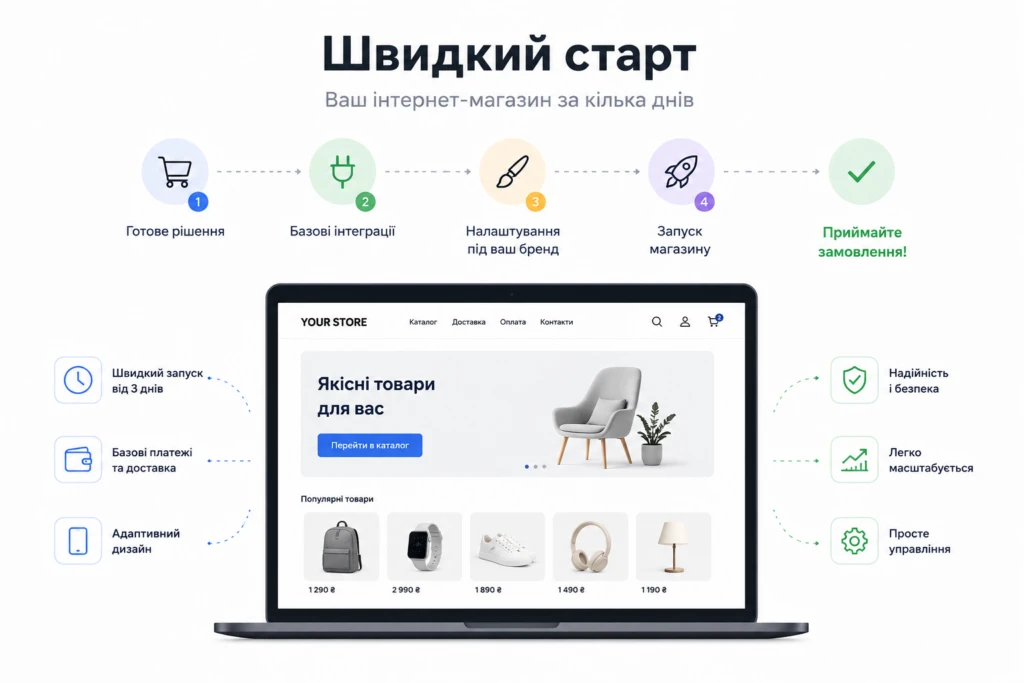
WooCommerce remains one of the most popular ways to launch an online store. The reason is simple: low entry cost. Businesses can get a working website relatively quickly and without huge upfront investments.
For smaller stores, WooCommerce is often a very practical solution:
- catalogs with a few thousand products;
- standard checkout functionality;
- basic SEO tasks;
- simple payment and delivery integrations;
- minimal custom business logic.
WordPress works especially well for companies that want to test a niche quickly or launch an MVP without investing heavily in custom development.
However, there’s an issue that many businesses only discover later.
Over time, most WooCommerce stores become overloaded with plugins:
- SEO tools;
- caching systems;
- filters;
- multilingual functionality;
- CRM integrations;
- marketplace integrations;
- warehouse management tools;
- automation plugins;
- custom checkout solutions.
After a year or two, the project often turns into a system where every update risks breaking something.
That’s why WordPress is excellent for a fast launch, but not always ideal for long-term scalability.
OpenCart: A Balance Between Speed and eCommerce Functionality
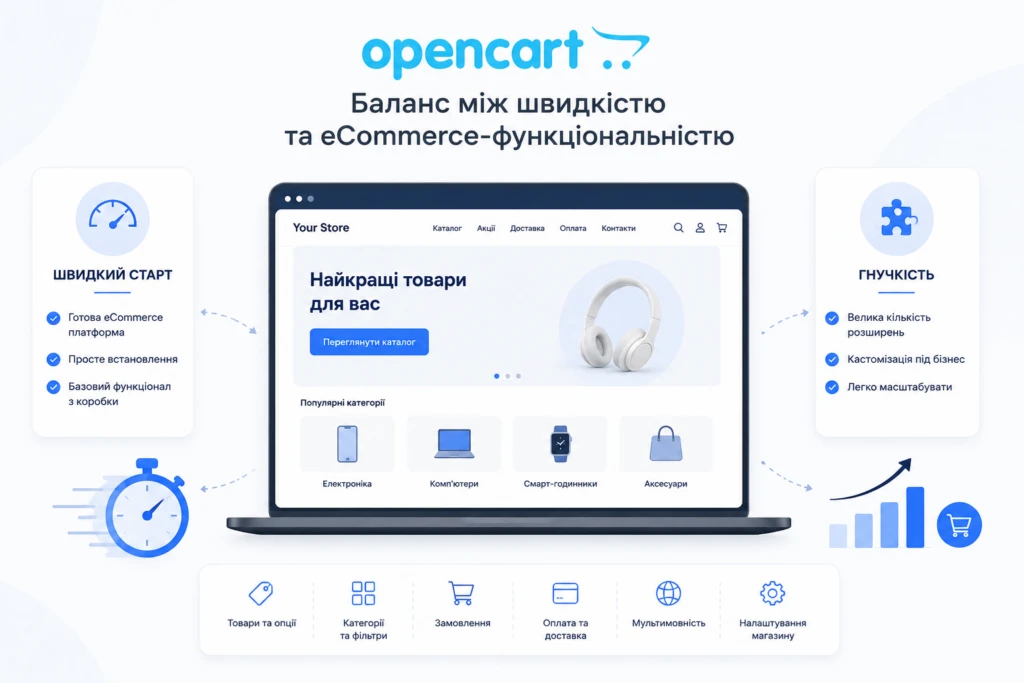
OpenCart has remained popular among eCommerce businesses for years — and for good reason.
Unlike WordPress, which originally started as a content management system, OpenCart was built specifically for online stores. It already includes:
- product management;
- categories;
- options and attributes;
- filtering systems;
- order management;
- multilingual support;
- eCommerce-focused structure.
Because of this, OpenCart often performs faster out of the box than WooCommerce.
For small and medium-sized businesses, it can be a very balanced solution:
- faster launch process;
- more logical store architecture;
- less dependency on huge numbers of plugins;
- simpler administration.
Still, OpenCart also has limitations.
As businesses grow, they usually require features that become difficult to implement within a template-based CMS architecture:
- advanced B2B functionality;
- personalized pricing;
- complex order workflows;
- multi-warehouse systems;
- ERP integrations;
- business process automation;
- advanced SEO management;
- custom checkout logic.
At this stage, OpenCart projects often begin accumulating technical debt:
- module conflicts;
- difficult updates after customization;
- declining performance;
- overloaded databases;
- duplicate pages and SEO issues.
That’s why OpenCart is a strong middle-ground solution between launch speed and eCommerce functionality — but only up to a certain business scale.
Laravel: When a Business Needs More Than Just a CMS
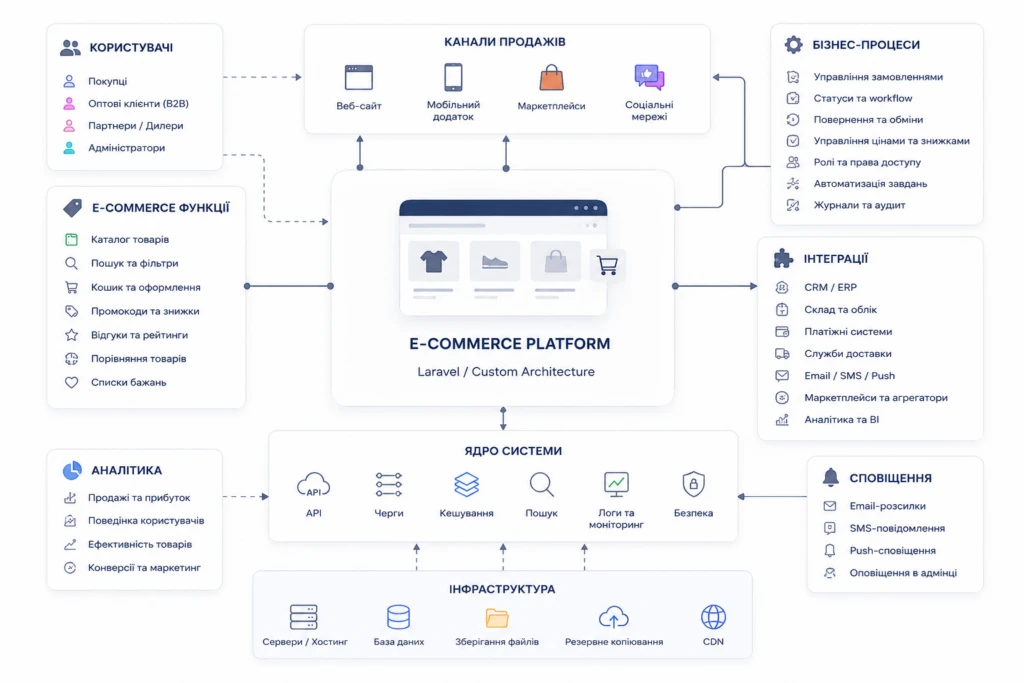
Laravel is no longer simply a “website framework.” It’s a full-scale foundation for building custom eCommerce systems.
Its biggest advantage is not launch speed — it’s control.
With Laravel, businesses can build systems around their processes instead of adapting their business model to CMS limitations.
This becomes especially important for:
- B2B platforms;
- manufacturers;
- wholesale businesses;
- marketplaces;
- custom business logic;
- complex integrations;
- large product catalogs;
- high-traffic stores.
A few years ago, Laravel’s biggest downside was development time. Today, that’s no longer always true.
At NextDoorCoders, we already have ready-made Laravel modules and architectural solutions for:
- authentication systems;
- eCommerce components;
- integrations;
- SEO structures;
- admin panels;
- caching systems;
- queues;
- API architecture.
Because of this, many core systems no longer need to be built from scratch.
In real-world projects, this often creates an unexpected result: a custom Laravel store can launch faster than an overloaded OpenCart or WordPress website filled with unstable plugins, module conflicts, and update issues.
This becomes especially noticeable in projects that require:
- stability;
- scalability;
- performance;
- advanced integrations;
- custom workflows;
- long-term flexibility.
What Actually Costs Less: CMS or Laravel?
Most businesses ask the wrong question.
They focus only on the initial launch budget. But the more important question is: how much will this platform cost over the next 3–5 years?
At the beginning, WordPress and OpenCart are usually cheaper.
But later, hidden costs start appearing:
- paid plugins;
- update conflicts;
- constant fixes;
- performance issues;
- technical debt;
- unstable integrations;
- difficult maintenance;
- SEO problems;
- plugin overload.
Laravel is usually more expensive at launch, but often cheaper when scaling.
The reason is simple: the architecture is designed correctly from the start.
Without chaotic plugin systems.
Without dozens of third-party dependencies.
Without adapting business processes to CMS limitations.
And the larger the business becomes, the more noticeable this difference gets.
SEO: Where Most Problems Begin
Many business owners think SEO depends only on content. In reality, the platform itself heavily affects search performance.
In WordPress, the biggest issue is plugin overload. One plugin generates sitemaps, another changes canonicals, and a third accidentally creates duplicate pages.
In OpenCart, a common issue is filter-based SEO duplication. Poorly configured filtering systems can generate thousands of technical URLs indexed by Google.
Laravel is more difficult at the beginning, but it provides one major advantage: complete SEO architecture control.
You can properly implement:
- URL structures;
- canonicals;
- pagination;
- filtering logic;
- caching;
- sitemaps;
- schema markup;
- multilingual SEO;
- indexing control.
Without fighting against CMS limitations.
So Which Platform Should You Choose in 2026?
There’s no universal answer.
If your business needs:
- a fast launch;
- a lower starting budget;
- an MVP;
- a relatively simple online store — then WordPress or OpenCart can be excellent solutions.
But if your company plans:
- scaling;
- automation;
- B2B functionality;
- advanced integrations;
- high traffic;
- custom business processes — then Laravel often becomes the more stable long-term investment.
The most important thing is not choosing a platform only for today.
You should choose based on what your business is expected to become in the next several years.
That’s where the real difference between CMS platforms and custom Laravel architecture becomes truly visible.
Many online stores start with template-based solutions. And that makes sense — a ready-made theme allows businesses to launch quickly, save money at the beginning, and start selling without months of custom development. That’s why WooCommerce, OpenCart, and ready-made Shopify themes are such popular choices for small and medium-sized businesses.
At first, everything usually works fine. There’s a product catalog, shopping cart, payment system, and delivery setup — the store handles all the basic tasks. But as the business grows, more products, traffic, ads, and integrations begin to appear, and the template-based store slowly turns from a “quick solution” into a real limitation.
Pages start loading slower, SEO growth stalls, checkout becomes unstable, and every new feature requires endless modifications. As a result, businesses lose customers without even realizing how much revenue is disappearing because of technical issues.
In this article, we’ll look at 10 reasons why a template-based online store can hurt sales growth — and what you can do about it without relying on endless plugins and temporary fixes.
1. Slow Page Loading Speed
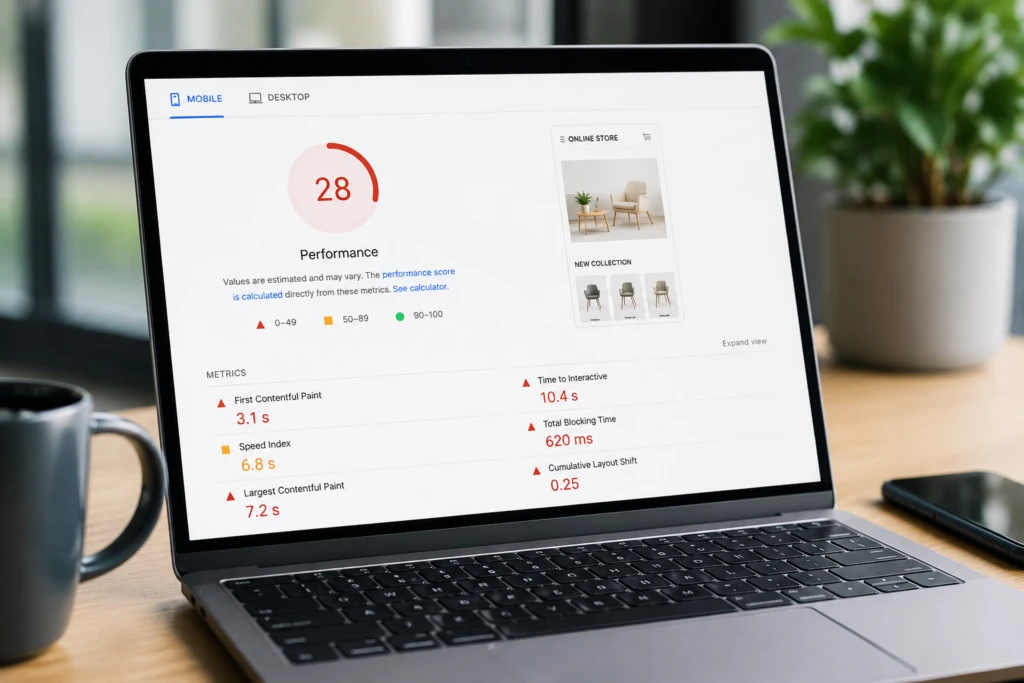
One of the most common problems with template-based stores is poor performance. Most ready-made themes are overloaded with features that many businesses never actually need. Inside the template, there may be dozens of styles, animations, scripts, page builders, and modules constantly loading in the background.
At first, the issue may not be obvious. But once the store fills up with products, banners, SEO modules, and marketing integrations, the system becomes significantly slower.
This is especially critical for mobile users. If a product page takes 5–7 seconds to load, many visitors simply leave the site and move to a competitor.
For eCommerce, speed directly impacts conversion rates. A slow website usually means:
- fewer orders
- more expensive advertising traffic
- higher bounce rates
- worse Google rankings
What to do
In most cases, the problem requires a combination of optimizations:
- image optimization
- enabling caching
- removing unnecessary plugins
- replacing heavy themes
- database optimization
- moving some features into custom-built solutions
2. Poor Mobile UX
Today, most purchases happen on smartphones. But many templates are only “technically responsive.” The website may look beautiful on a desktop, while being frustrating to use on mobile devices.
Typical problems include:
- tiny buttons
- inconvenient navigation menus
- filters covering content
- text that’s too small
- laggy scrolling
- oversized banners
- complicated checkout flows
Because of this, users simply abandon the purchase process.
Many store owners review the website only from a desktop computer and never notice mobile usability issues. Real customers, however, interact with the site in a completely different way.
Good mobile UX is not just about having a responsive design — it’s about creating a fast, simple interface where users can place an order within minutes.
3. Checkout Is Overloaded With Unnecessary Steps
Checkout is the most important stage of any online store. This is where businesses either get paid or lose the customer.
In template-based stores, checkout is often built using outdated logic. The system may require:
- account registration
- unnecessary contact information
- email confirmation
- multiple checkout steps
- extra fields
For customers, this creates unnecessary friction.
The issue becomes even more noticeable on smartphones, where every additional field reduces the chance of completing the order.
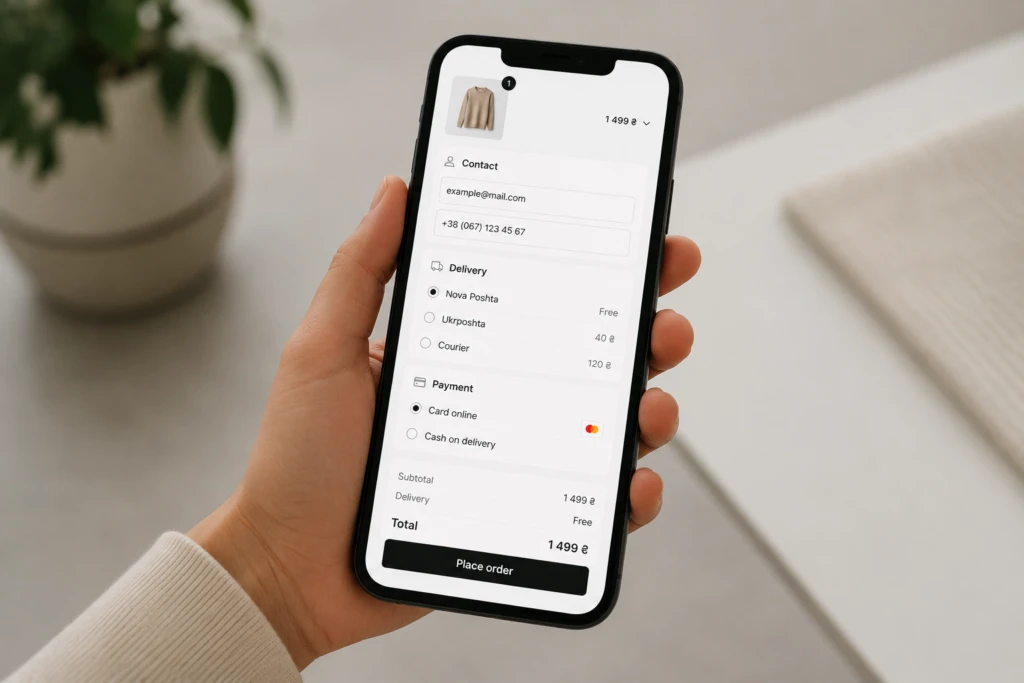
What improves checkout conversion
The most effective checkout flows usually include:
- guest checkout
- minimal number of fields
- autofill support
- fast payment methods
- clear structure
- properly optimized mobile experience
Sometimes even simplifying checkout by one or two steps can noticeably increase sales without increasing the advertising budget.
4. Too Many Plugins
This is a classic issue for almost every template-based store.
First, the owner installs an SEO plugin. Then a caching module. Then filters. Then a page builder. Then several integrations.
A year later, the store may already be running on 30–50 plugins at the same time.
As a result, the system becomes unstable:
- plugin conflicts appear
- errors become more common
- performance drops
- updates break functionality
- server load increases dramatically
And most importantly — the more “fixes” the system relies on, the harder it becomes to maintain in the future.
5. The Template Doesn’t Match Business Processes
Ready-made themes are designed for the widest possible audience. But every business has its own internal processes.
For example:
- wholesale pricing
- multiple warehouses
- custom delivery logic
- complex order statuses
- CRM integrations
- B2B functionality
- personalized customer conditions
In template-based stores, these tasks are often implemented through chaotic modifications.
At some point, the system starts looking like a collection of temporary workarounds where every new feature risks breaking something else.
6. SEO Structure Quickly Becomes a Problem
Many templates have serious SEO issues right out of the box.
This is especially noticeable in stores with large catalogs, filters, and categories.
Typical problems include:
- duplicate pages
- incorrect pagination
- messy URLs
- weak internal linking
- duplicate meta titles
- automatically generated SEO pages without proper logic
As a result, Google wastes crawl budget indexing useless pages instead of properly ranking products and categories.
7. The Website Starts Breaking Under Load
At the beginning, the store may work perfectly even on cheap hosting. But as the number of products, visitors, and integrations grows, the situation changes.
This becomes especially noticeable during:
- promotions
- seasonal sales
- Black Friday
- ad campaign launches
- bulk product imports
Typical symptoms include:
- slow admin panel
- frozen checkout
- checkout errors
- overloaded servers
- unstable website behavior
For businesses, this means direct revenue loss.
8. The Store Looks “Like Everyone Else”
Popular templates are used by thousands of stores. Because of this, customers stop perceiving the website as a unique brand.
Even if the products are good, the store may still look cheap or generic.
In eCommerce, this matters more than many business owners realize. Users subconsciously judge store credibility based on interface quality, structure, and overall user experience.
That’s why even small design customizations can positively impact trust and conversion rates.
9. Every Modification Becomes Expensive
At first, templates seem like an affordable solution. But over time, businesses constantly spend money on:
- feature modifications
- bug fixes
- speed optimization
- plugin conflicts
- update compatibility
- support for outdated plugins
After several years, the total cost of these “small fixes” may exceed the cost of proper custom development.
This is one of the main reasons why many businesses eventually migrate to custom solutions.
10. The Business Becomes Afraid of Making Changes
This is the final stage of a problematic template-based store.
The team already knows that:
- updates may break the website
- new plugins may conflict with old ones
- checkout works inconsistently
- the website may crash under traffic spikes
As a result, the business becomes afraid to change anything at all. And that becomes a serious limitation for growth.
Fix Plan: What to Do Next
The biggest mistake is trying to solve every issue by installing another plugin.
A systematic approach works much better.
A basic improvement plan usually looks like this:
- Perform a technical audit
- Analyze website speed and mobile UX
- Identify conversion loss points
- Optimize checkout
- Remove unnecessary modules
- Fix the SEO structure
- Optimize the server and database
- Decide whether optimization is enough or if migration to a different architecture is required
In many cases, a store can be significantly improved without rebuilding everything from scratch. But it’s important to solve problems at the architectural level instead of endlessly patching the system.
Conclusion
A template-based online store is a good solution for launching quickly. But as a business grows, the template often becomes the reason behind lost sales, SEO problems, and constant technical limitations.
Slow performance, overloaded checkout, dozens of plugins, and unstable functionality gradually start costing businesses much more than expected.
That’s why it’s important to regularly analyze the store’s condition, optimize weak points, and rebuild the system around real business needs — not around the limitations of a template.
When it comes to building an online store, many people confuse two key concepts — UI and UX. At first glance, they may seem like the same thing, but in reality, there’s a fundamental difference between them. And understanding this difference often determines whether your website will generate sales or simply “exist.”
Let’s start with a simple explanation.
UX (User Experience) is the overall experience a user has while interacting with your website. It’s about how easy it is to find a product, how clear the checkout process is, and whether the user faces any friction along the way.
UI (User Interface), on the other hand, is the visual part of your website. It includes buttons, colors, typography, icons, and the overall look and feel.

It’s important to understand: UI is a part of UX, but not the other way around.
A website can look beautiful but still be frustrating to use. And this is one of the most common mistakes in eCommerce.
Imagine this: you land on a stylish website with modern animations and great visuals, but you can’t find the “Buy” button or the checkout process takes too long. Most likely, you’ll leave and go to a competitor.
This is exactly where UX makes the difference.
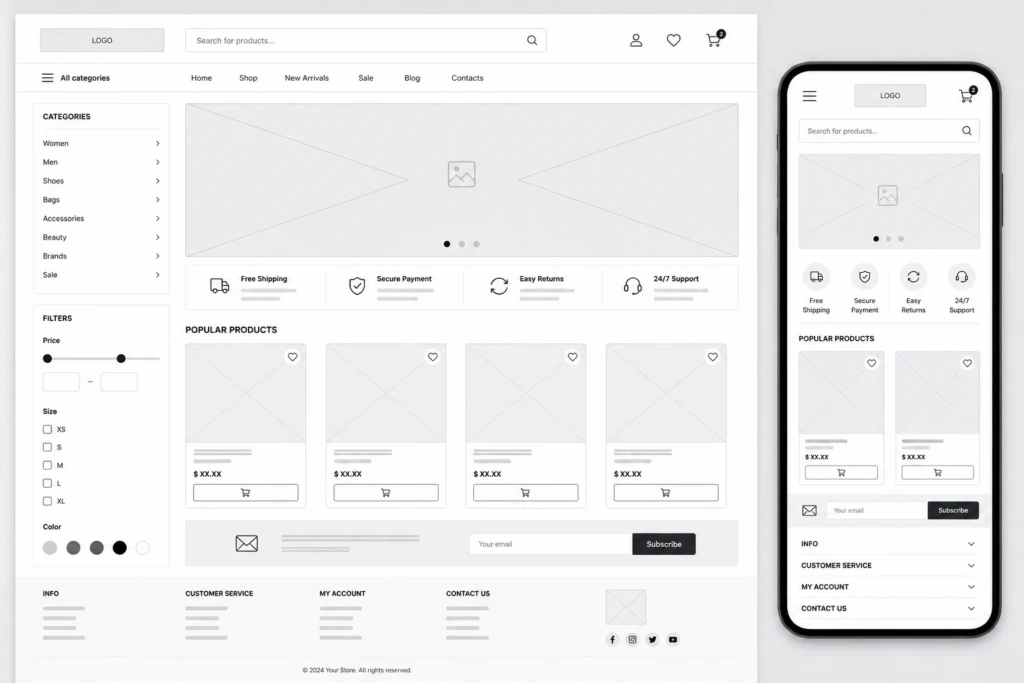
What’s included in eCommerce UX:
- Logical catalog structure
- Intuitive navigation
- Fast product search
- Simple checkout process
- Mobile responsiveness
What’s included in UI:
- Button design
- Color palette
- Typography
- Icons
- Visual hierarchy
Why this matters for sales
Ignoring UX directly impacts your revenue. If users feel uncomfortable navigating your site, they won’t buy. It’s that simple.
Common UX issues:
- High bounce rate
- Abandoned carts
- Low conversion rate
- Poor user experience
The good news is that even small improvements can make a noticeable difference.
For example:
- Simplifying the checkout form
- Clear call-to-action buttons
- Fast page loading speed
- Well-structured categories
Balancing UI and UX is the key to success
The ideal online store combines aesthetics with usability.
Users should not only enjoy the design but also achieve their goal — making a purchase — effortlessly.
In simple terms:
UX answers the question “How easy is it to use?”,
while UI answers “How does it look?”
Only together do they create an experience that keeps users coming back.
Conclusion
If you’re planning to launch or redesign an online store, don’t focus on visuals alone.
A well-thought-out UX combined with strong UI is not an expense — it’s an investment that directly impacts your conversion rate and revenue.